Welcome: Build a Cloud-Native Simple App
Meet the application, the learning path, and the safe practice loop used throughout the tutorial.
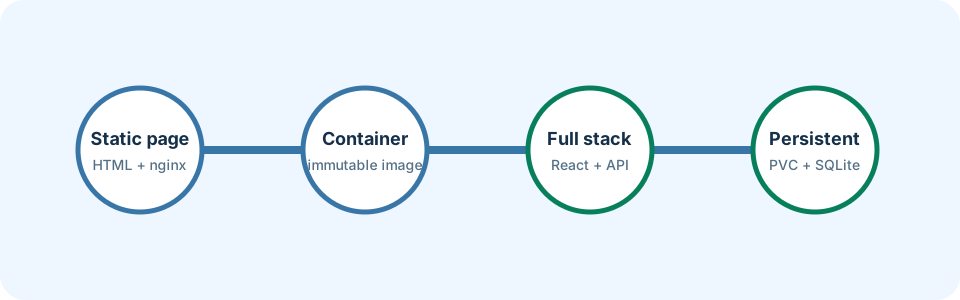
Many teams struggle to deploy the same application reliably on every laptop and every cluster. In this tutorial you learn modern DevOps practices by building one small web app step by step: first a static page, then React and FastAPI, then durable storage—always through the IVIA generic Helm chart.
DevOps is the habit of automating how software is built, tested, configured, and released so changes are repeatable and observable. Cloud-native means designing that software for automation: immutable images, external configuration, replaceable processes, and infrastructure described in versioned files.
Last updated: 2026-07-20
Who this chapter is for
This chapter is for beginners who know basic command-line use and can open a browser download. You do not need prior Kubernetes, Helm, Docker, or DevOps experience. Basic Git familiarity helps later, but is not required here.
Download this chapter's files
Use your browser to download either ivia-chapter-01.tar.gz or ivia-chapter-01.zip. The archive is self-contained; you do not need this tutorial repository.
Open a terminal after the browser download:
cd ~/Downloads
tar -xzf ivia-chapter-01.tar.gz
cd ivia-chapter-01
All remaining relative paths in this chapter start from that extracted directory.
The challenge
Challenge: identify each layer of the final application and prove that your command-line tools are reachable. This is one challenge with two small checkpoints: understanding the destination and checking your starting point.
Prerequisites
- A terminal: Terminal on macOS/Linux or PowerShell on Windows.
- The small Chapter 1 resources archive downloaded above.
- Curiosity and permission to create containers and a local Kubernetes cluster later.
- About 6 GB of free memory and 20 GB of free disk space for later chapters.
- No cloud account is required; Chapter 3 covers the remaining tools.
Learning goals
After this chapter, you will be able to:
- Describe the roles of the browser, frontend, backend, container image, Helm release, and Kubernetes cluster
- Distinguish source code from a built image and a running container
- Use the tutorial's build → deploy → observe → improve loop
- Find complete stage snapshots as known-good references
- Outline what each later chapter will add to the application
What you will build
By the end of the main path you will run a browser UI (React served by nginx), an API (FastAPI), and optional SQLite storage on a PersistentVolumeClaim. Ingress routes hostnames to Services; the IVIA generic Helm chart creates those Kubernetes objects from values you edit.
Tutorial roadmap
- Chapter 1: Orient yourself and learn the practice loop.
- Chapter 2: Connect cloud-native ideas, 12-factor design, and Helm rendering.
- Chapter 3: Install Docker, kubectl, Helm, and Minikube, then verify a local cluster.
- Chapter 4: Build and run a static nginx container image.
- Chapter 5: Deploy that image with the generic Helm chart.
- Chapter 6: Move configuration into ConfigMaps and Secrets.
- Chapter 7: Add health probes and diagnose a controlled failure.
- Chapter 8: Run React and FastAPI as two local containers.
- Chapter 9: Connect them in Kubernetes with CORS and Ingress.
- Chapter 10: Persist data with a PVC and review the whole journey.
- Appendix A (Chapter 11): Trace DNS, TCP, and HTTP when networking fails.
- Appendix B (Chapter 12): Automate build and deploy with GitLab CI.
Orient yourself
We list the package contents so you know you are in the right place before later chapters ask you to build or deploy.
pwd
find . -maxdepth 1 -type f -print
You should see README.txt. Later chapter downloads are deliberately complete: the static package contains nginx and chart values, the full-stack package adds React and FastAPI, and the persistent package adds SQLite storage.
The IVIA generic chart is fixed to version 4.8.0 in every Helm command. Pinning makes today's lesson reproducible even after a newer chart is published.
The practice loop
- Build an immutable container image from source.
- Deploy that image by describing values, not by hand-editing cluster objects.
- Observe Pods, Services, logs, and HTTP responses.
- Improve one concern—configuration, health, networking, or persistence.
Kubernetes is a collection of control loops. You state the result you want; controllers continually work toward it. A failing Pod is useful evidence, not a verdict on your ability.
Expected validation
Your path should end in ivia-chapter-01, and the final command should list README.txt. Nothing is built or deployed in this chapter.
Say the architecture aloud in one sentence: “A browser loads React from nginx, React calls FastAPI through ingress, and the backend optionally stores messages on a persistent volume.” If that sentence makes sense, the challenge is complete.
Troubleshooting and common pitfalls
- Wrong directory: return to your Downloads folder and enter
ivia-chapter-01. findis unavailable in PowerShell: use the PowerShell command shown above.- Trying to memorize everything: use the snapshots. Experienced engineers rely on known-good references too.
- Treating warnings as failures: read the final status and exit code; a warning may still lead to a successful command.
Recap and practice
Recap: DevOps automates reliable delivery; cloud-native apps are built for that automation. This tutorial grows one app from a static page to a persistent full-stack system using the generic Helm chart.
Try to explain in your own words:
- What is the difference between source code, an image, and a container?
- Why does this tutorial pin Helm chart version 4.8.0?
Exercise: Write one sentence describing what Chapter 5 will let you do that Chapter 4 alone cannot.
Stretch: Sketch the final request path on paper (browser → ingress → frontend / API → storage) and label which chapter introduces each piece.