Appendix: Build and Deploy with GitLab CI
Turn the verified commands into a reviewable pipeline that builds two images and deploys pinned chart version 4.8.0.
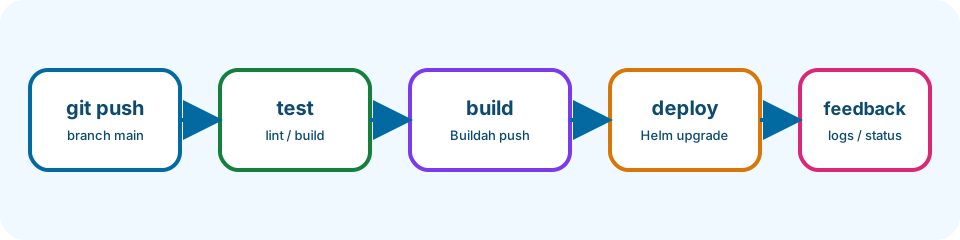
Every time you push code to the default branch, tests can run, images can rebuild, and Helm can deploy—without copying secrets into Git. That feedback loop is CI/CD (continuous integration and continuous delivery). Continuous integration should automate commands you already understand. The persistent stage includes an example pipeline at persistent-app/.gitlab-ci.yml; it builds frontend and backend images with Buildah, then deploys their immutable commit tags with Helm.
Last updated: 2026-07-20
Who this chapter is for
This appendix is for beginners who completed the main tutorial path and have access to a GitLab project with a Container Registry and suitable runners. You do not need to invent a new pipeline—read and validate the packaged one.
Download this chapter's files
Use your browser to download either ivia-chapter-12.tar.gz or ivia-chapter-12.zip. The archive is self-contained; you do not need this tutorial repository.
Open a terminal after the browser download:
cd ~/Downloads
tar -xzf ivia-chapter-12.tar.gz
cd ivia-chapter-12
All remaining relative paths in this chapter start from that extracted directory.
The challenge
Challenge: validate the example pipeline configuration and map every required CI/CD variable to its purpose without placing a secret in Git.
Prerequisites
- A GitLab project with Container Registry enabled.
- A runner capable of Buildah jobs and a deploy runner that can reach the Kubernetes API.
- A target namespace and authorized kubeconfig.
- The persistent stage source and chart values.
- Maintainer access to configure protected/masked CI/CD variables.
Learning goals
After this chapter, you will be able to:
- Explain pipeline stages, triggers, and where to read failure logs
- Use commit SHA image tags
- Pass registry credentials safely
- Pin chart version 4.8.0
- Understand deployment serialization and rollback behavior
Inspect and validate
sed -n '1,260p' persistent-app/.gitlab-ci.yml
If the GitLab CLI is installed and authenticated, validate through the project API:
glab ci lint persistent-app/.gitlab-ci.yml
Otherwise copy the file contents into Build > Pipeline editor > Validate in GitLab. To run this package unchanged, push the extracted directory as the project root and set Settings > CI/CD > General pipelines > CI/CD configuration file to persistent-app/.gitlab-ci.yml. Its paths are relative to that self-contained project root.
Configure variables in GitLab
In Settings > CI/CD > Variables, add:
KUBECONFIG_B64: base64-encoded least-privilege kubeconfig; masked and protected.K8S_NAMESPACE: target namespace; protected if production-like.FRONTEND_HOST: for examplesimple-app.example.org.BACKEND_HOST: for exampleapi.simple-app.example.org.
GitLab supplies CI_REGISTRY, CI_REGISTRY_IMAGE, CI_REGISTRY_USER, CI_REGISTRY_PASSWORD, and CI_COMMIT_SHA when the project registry is enabled. Do not copy their values into YAML.
Create the kubeconfig value:
base64 -w 0 path/to/limited-kubeconfig
Treat the output as a secret. Paste it directly into GitLab, not a shell history shared with others.
Understand the pipeline
Trigger: the packaged deploy job runs when $CI_COMMIT_BRANCH == $CI_DEFAULT_BRANCH (usually main). Test and build jobs define the earlier stages of the same file.
Stages
- test — builds the React frontend and compiles the Python backend so broken code fails before images are pushed.
- build — two Buildah jobs log in to the GitLab registry, build independent images, and push tags equal to
CI_COMMIT_SHA. - deploy — decodes kubeconfig and runs Helm with pinned chart
4.8.0.
If a test fails, open the job log in GitLab; later stages do not start. If a build fails, check registry login and Dockerfile context paths. If deploy fails, read the Helm job log and cluster events for the target namespace.
The deploy job executes:
helm upgrade --install simple-app \
  oci://harbor.ivia.ch/ivia-generic-helm-chart/ivia-generic-helm-chart \
  --version 4.8.0 \
  --namespace "$K8S_NAMESPACE" --create-namespace \
  --atomic --timeout 10m \
  -f persistent-app/values.yaml \
  --set components.frontend.image.repository="$CI_REGISTRY_IMAGE/frontend" \
  --set components.frontend.image.tag="$CI_COMMIT_SHA" \
  --set components.backend.image.repository="$CI_REGISTRY_IMAGE/backend" \
  --set components.backend.image.tag="$CI_COMMIT_SHA" \
  --set components.frontend.ingress.url="$FRONTEND_HOST" \
  --set components.backend.ingress.url="$BACKEND_HOST"
Immutable commit tags tie a deployment to exact source. --atomic rolls back failed upgrades and returns failure to GitLab. A resource_group prevents two deploy jobs from changing the same release concurrently.
Expected validation
GitLab's linter reports valid syntax. On a configured runner, test and both build jobs pass before deploy starts; the registry contains /frontend:$CI_COMMIT_SHA and /backend:$CI_COMMIT_SHA; helm status simple-app -n "$K8S_NAMESPACE" reports deployed.
Troubleshooting and common pitfalls
- Pipeline valid but job cannot run: runner tags must match available runners; tags are organization-specific.
- Buildah permission or mount errors: use a runner configured for rootless or privileged Buildah according to your platform policy.
- Registry unauthorized: use GitLab-provided credentials and
--password-stdin; verify Container Registry is enabled andCI_REGISTRY_IMAGEis non-empty. - Kubeconfig decode fails: remove wrapped lines before storing the base64 value and keep file permissions at 600.
- Deploy cannot pull images: create an image pull secret or attach the appropriate
regcredthrough chart values. - Concurrent deployments race: retain one
resource_groupfor the environment. - Using
latest: commit SHA tags are auditable and avoid node cache ambiguity. - Secrets echoed in logs: never enable shell tracing around login or kubeconfig commands.
Recap and practice
Recap: CI/CD reuses the commands you already practiced. Stages give fast feedback; secrets stay in GitLab variables; commit tags keep deploys auditable.
Try to explain in your own words:
- What happens to deploy if the frontend test job fails?
- Why is a commit SHA tag safer than
latestfor production-like deploys?
Exercise: In the pipeline editor, add a comment above the deploy job summarizing its required variables in your own words (do not commit real secrets).
Stretch: Add a lightweight lint job (for example running helm template on persistent-app/values.yaml in CI) and confirm it appears before deploy.