Connect Frontend, Backend, CORS, and Ingress
Deploy both images to Minikube, route two hostnames through ingress, and allow the browser origin explicitly.
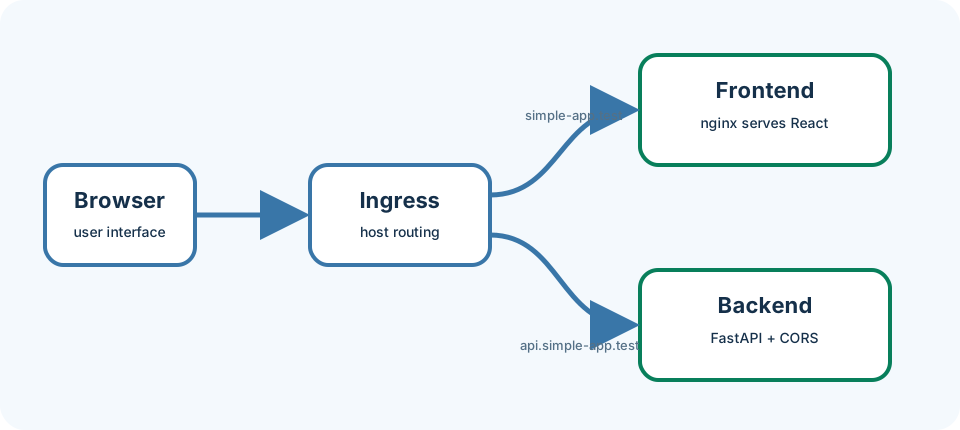
Kubernetes Services solve Pod-to-Pod addressing, but a browser needs externally resolvable HTTP routes. An Ingress is an HTTP router at the edge of the cluster: it matches hostnames and forwards to Services. CORS is a browser rule that decides whether a page from one origin may call an API on another. DNS / hosts mapping tells your computer which IP belongs to those hostnames.
Last updated: 2026-07-20
Who this chapter is for
This chapter is for beginners who ran the two containers locally in Chapter 8 and have a Ready Minikube cluster. You will enable the ingress addon and edit hosts or use curl --resolve.
Download this chapter's files
Use your browser to download either ivia-chapter-09.tar.gz or ivia-chapter-09.zip. The archive is self-contained; you do not need this tutorial repository.
Open a terminal after the browser download:
cd ~/Downloads
tar -xzf ivia-chapter-09.tar.gz
cd ivia-chapter-09
All remaining relative paths in this chapter start from that extracted directory.
The challenge
Challenge: deploy the full-stack snapshot and load the frontend through ingress with a successful cross-origin API request.
Prerequisites
- Running Minikube, kubectl, Helm, and Docker.
- The node label
ivia.ch/nodetype=app. - Ports 80 and 443 available to Minikube's ingress path.
- The full-stack snapshot; no local frontend/backend containers should occupy ports needed for testing.
Learning goals
After this chapter, you will be able to:
- Build frontend and backend images into Minikube
- Enable the nginx ingress controller and wait until it is Ready
- Map test hostnames for browser access
- Trace browser-to-API traffic
- Diagnose CORS separately from networking
Build images where Minikube can use them
We build inside Minikube so the cluster nodes see the same tags the chart requests.
minikube image build -t simple-backend:local fullstack-app/backend
minikube image build -t simple-frontend:local fullstack-app/frontend
minikube image ls | grep -E 'simple-(frontend|backend)'
You should see both image names in the list.
Enable ingress and deploy
We enable the addon because the Ingress objects need a controller Pod that actually routes traffic.
minikube addons enable ingress
kubectl wait --namespace ingress-nginx \
  --for=condition=Ready pod \
  --selector=app.kubernetes.io/component=controller \
  --timeout=180s
kubectl label node minikube ivia.ch/nodetype=app --overwrite
helm upgrade --install simple-app \
  oci://harbor.ivia.ch/ivia-generic-helm-chart/ivia-generic-helm-chart \
  --version 4.8.0 -n tutorial --create-namespace \
  --atomic --timeout 5m \
  -f fullstack-app/values.yaml
kubectl get pods,services,ingresses -n tutorial
Expected: both app Pods 1/1 Running, and Ingress objects listing simple-app.test and api.simple-app.test. The controller wait should complete without timeout.
Values mount a runtime config.js containing http://api.simple-app.test. Backend CORS_ORIGINS permits only http://simple-app.test. The ingress annotations disable HTTPS redirection for this local exercise; production should use valid TLS.
Resolve local hostnames
First validate without changing DNS. We do this because curl --resolve proves routing independently of your hosts file.
MINIKUBE_IP=$(minikube ip)
curl --fail --resolve simple-app.test:80:$MINIKUBE_IP http://simple-app.test/
curl --fail --resolve api.simple-app.test:80:$MINIKUBE_IP http://api.simple-app.test/health
curl --fail --resolve api.simple-app.test:80:$MINIKUBE_IP \
  -H 'Origin: http://simple-app.test' \
  -H 'Access-Control-Request-Method: GET' \
  -X OPTIONS -i http://api.simple-app.test/api/greeting
You should get HTML from the frontend host, health JSON from the API host, and a preflight response that includes access-control-allow-origin: http://simple-app.test.
For browser access, append both names to /etc/hosts:
echo "$(minikube ip) simple-app.test api.simple-app.test" | sudo tee -a /etc/hosts
Open http://simple-app.test and inspect the browser Network panel. The document comes from the frontend host; /api/greeting comes from the API host.
Expected validation
Both Pods are 1/1 Running. Both Ingress objects list their host. The preflight response includes access-control-allow-origin: http://simple-app.test, and the browser displays Hello from a configured FastAPI pod!.
Troubleshooting and common pitfalls
- Ingress has no address: wait for the addon controller and inspect
kubectl get pods -n ingress-nginx. - Browser DNS error: verify both host entries and flush browser DNS cache; curl
--resolveconfirms routing independently. - HTTP redirects to HTTPS: ensure values include
nginx.ingress.kubernetes.io/ssl-redirect: "false". - CORS failure despite HTTP 200: backend must permit the exact frontend origin, including scheme and port.
ImagePullBackOff: verify local images andIfNotPresentpull policy.- Docker-driver ingress unreachable: run
minikube tunnelin a separate terminal if your platform requires it, then use127.0.0.1for hosts. - Editing frontend source for API URL: change the chart-managed runtime ConfigMap instead; one image should serve multiple environments.
Recap and practice
Recap: Ingress routes hostnames; hosts/--resolve maps names to Minikube; CORS is a separate browser check on the API response.
Try to explain in your own words:
- Why can curl succeed when the browser still reports a CORS error?
- What does the ingress controller do that a Service alone does not?
Exercise: Break CORS by temporarily removing the frontend origin from values, upgrade, reload the page, then restore the correct origin.
Stretch: Capture the OPTIONS preflight in the browser Network panel and list three response headers that matter for CORS.