Persist Data with a PVC
Store messages in SQLite on a PersistentVolumeClaim, verify restart survival, and understand stateful scaling tradeoffs.
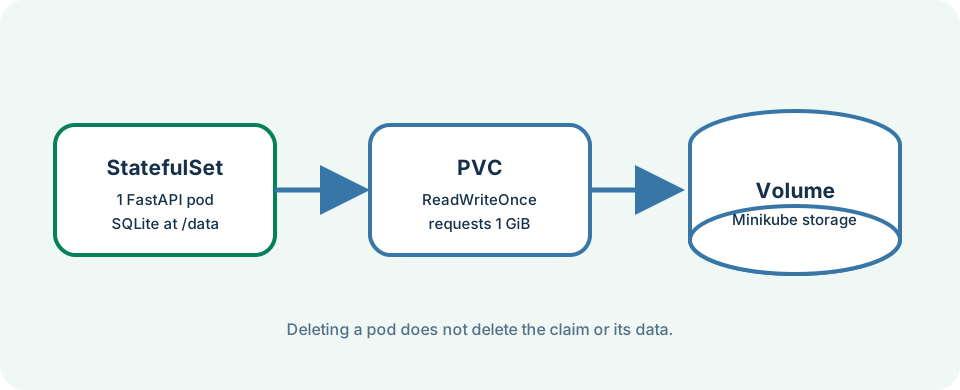
Pods are replaceable. A PersistentVolumeClaim (PVC) asks Kubernetes for storage whose lifecycle is separate from a particular Pod. The persistent snapshot mounts one claim at /data, where FastAPI stores messages.db. This chapter also consolidates the main tutorial path and suggests what to try next.
Last updated: 2026-07-20
Who this chapter is for
This chapter is for beginners who completed the full-stack ingress lesson (Chapter 9) or can deploy the persistent package from scratch with Minikube ingress available.
Download this chapter's files
Use your browser to download either ivia-chapter-10.tar.gz or ivia-chapter-10.zip. The archive is self-contained; you do not need this tutorial repository.
Open a terminal after the browser download:
cd ~/Downloads
tar -xzf ivia-chapter-10.tar.gz
cd ivia-chapter-10
All remaining relative paths in this chapter start from that extracted directory.
The challenge
Challenge: create a message, delete the backend Pod, and prove the replacement Pod reads the same message from persistent storage.
Prerequisites
- A running Minikube cluster with the ingress addon available.
- Helm, kubectl, and the Minikube node label.
- Test host resolution or willingness to use
curl --resolve/ PowerShell with hosts entries. - About 1 GiB of provisionable Minikube storage.
Learning goals
After this chapter, you will be able to:
- Create a chart-managed PVC
- Mount the PVC into a StatefulSet
- Verify data survival across Pod replacement
- Explain why this SQLite design deliberately uses one replica
- Summarize the main tutorial journey and choose a sensible next step
Build persistent images
minikube addons enable ingress
kubectl label node minikube ivia.ch/nodetype=app --overwrite
minikube image build -t simple-backend:persistent persistent-app/backend
minikube image build -t simple-frontend:persistent persistent-app/frontend
Inspect the important values:
grep -n -E 'type:|replicaCount:|pvcs:|mountPath:|storage:|storageClassName:' \
  persistent-app/values.yaml
The backend is a one-replica StatefulSet. Its unnamed claim becomes simple-app-backend-0, requests 1Gi, uses ReadWriteOnce, and mounts at /data. We use a StatefulSet here because stable Pod identity pairs well with a dedicated volume claim.
Deploy and wait for storage
helm upgrade --install simple-app \
  oci://harbor.ivia.ch/ivia-generic-helm-chart/ivia-generic-helm-chart \
  --version 4.8.0 -n tutorial --atomic --timeout 5m \
  -f persistent-app/values.yaml

kubectl get statefulset,pods,pvc -n tutorial
kubectl wait --for=condition=Ready pod \
  -l app.kubernetes.io/component=backend \
  -n tutorial --timeout=180s
You should see the PVC Bound and the backend Pod 1/1 Running.
Write, replace, and read
Ensure hostnames resolve before calling the API. On Windows, add hosts entries if Chapter 9 did not already (Administrator PowerShell):
$ip = minikube ip
Add-Content `
  -Path "$env:WINDIR\System32\drivers\etc\hosts" `
  -Value "$ip simple-app.test api.simple-app.test"
MINIKUBE_IP=$(minikube ip)
curl --fail --resolve api.simple-app.test:80:$MINIKUBE_IP \
  -H 'Origin: http://simple-app.test' \
  -H 'Content-Type: application/json' \
  -d '{"text":"I survived a Pod restart!"}' \
  http://api.simple-app.test/api/messages
curl --fail --resolve api.simple-app.test:80:$MINIKUBE_IP \
  http://api.simple-app.test/api/messages
Delete only the Pod, not the claim:
BACKEND_POD=$(kubectl get pod -n tutorial \
  -l app.kubernetes.io/component=backend \
  -o jsonpath='{.items[0].metadata.name}')
kubectl delete pod "$BACKEND_POD" -n tutorial
kubectl wait --for=condition=Ready pod \
  -l app.kubernetes.io/component=backend \
  -n tutorial --timeout=180s
curl --fail --resolve api.simple-app.test:80:$MINIKUBE_IP \
  http://api.simple-app.test/api/messages
Both list responses should still contain I survived a Pod restart!.
Stateful tradeoffs
This KISS design is educational, not horizontally scalable. A ReadWriteOnce claim is normally mounted read-write by one node, and SQLite expects one shared local file. Two backend replicas could contend for the file or be unable to mount it as intended. For multiple replicas, use a networked database such as PostgreSQL, add migrations and backups, and keep API Pods stateless.
A StatefulSet gives stable Pod identity and ordered replacement; the PVC gives durable storage. Neither automatically provides backups, replication, encryption, or disaster recovery.
Expected validation
The PVC shows Bound; the backend Pod is 1/1 Running; both list requests contain I survived a Pod restart!; and the replacement Pod has a newer age than the PVC. The browser message board should show the same entry.
Troubleshooting and common pitfalls
- PVC stays
Pending: runkubectl get storageclassandkubectl describe pvc simple-app-backend-0 -n tutorial; Minikube normally providesstandard. - Permission denied at
/data: keep the image's/dataownership and non-root user setup intact; inspect backend logs. - Deleting the namespace or PVC: that can delete stored data. The challenge deletes only the Pod.
- Scaling to two replicas: do not scale this SQLite stage; migrate durable state to a multi-client database first.
- Health endpoint returns 503: it tests SQLite access; inspect mount events, filesystem permission, and logs.
- Assuming PVC equals backup: take an independent backup before upgrades or destructive tests.
- Windows hostname failures: confirm hosts entries or always pass
--resolvewithminikube ip.
Tutorial wrap-up and next steps
You have walked a complete cloud-native path:
- Built immutable images and ran them locally
- Deployed with the IVIA generic Helm chart instead of one-off manifests
- Externalized configuration and practiced Secrets carefully
- Used probes and events to investigate failures
- Connected React and FastAPI through Ingress and CORS
- Separated replaceable compute from durable PVC storage
Reflection
- How would you explain DevOps to a friend using this tutorial as the example?
- Which step in the path feels most fragile on a shared laptop cluster, and why?
- Where would you keep durable data if you needed three API replicas tomorrow?
Concrete next steps
- Deploy a second small service and call it from the backend.
- Replace SQLite with a networked database and keep API Pods stateless.
- Experiment with raising frontend replicas after Chapter 5’s stretch exercise.
- Continue with Appendix Chapters 11 (networking diagnostics) and 12 (GitLab CI).
Recap and practice
Recap: PVCs outlive Pods; StatefulSets pair identity with volumes; SQLite on ReadWriteOnce stays single-replica on purpose.
Try to explain in your own words:
- What is deleted when you delete a Pod versus a PVC?
- Why is “just scale the backend to 3” unsafe for this snapshot?
Exercise: Create a second message after Pod replacement and confirm both messages remain.
Stretch: Describe the PVC with kubectl describe pvc simple-app-backend-0 -n tutorial and note the StorageClass, capacity, and access mode.