Containerize a Static nginx Page
Build a small immutable nginx image, run it locally, and inspect its HTTP health endpoint.
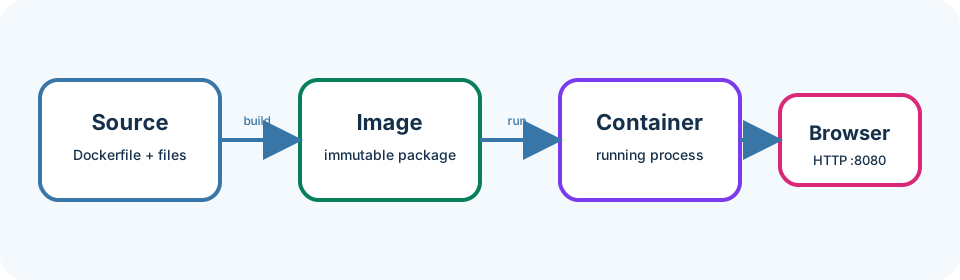
A container packages your application and its runtime so it behaves the same on your laptop and in Kubernetes. Think of it as a shipping box: the contents and instructions travel together, so the destination does not need a custom install of nginx.
Last updated: 2026-07-20
Who this chapter is for
This chapter is for beginners who completed Chapter 3 (or already have a working Docker engine). You will build and run one small image. No Kubernetes commands are required here.
Download this chapter's files
Use your browser to download either ivia-chapter-04.tar.gz or ivia-chapter-04.zip. The archive is self-contained; you do not need this tutorial repository.
Open a terminal after the browser download:
cd ~/Downloads
tar -xzf ivia-chapter-04.tar.gz
cd ivia-chapter-04
All remaining relative paths in this chapter start from that extracted directory.
The challenge
Challenge: build simple-static:local, run it as a non-interactive container, and retrieve both the page and health endpoint.
Prerequisites
- Docker or a Docker-compatible CLI with a running engine.
- The extracted Chapter 4 package, with your terminal in its top-level directory.
- Port 8080 available locally.
- No Kubernetes knowledge beyond Chapter 3 is required.
Learning goals
After this chapter, you will be able to:
- Read a simple Dockerfile from top to bottom
- Distinguish image build time from container runtime
- Map a host port to a container port
- Validate HTTP behavior and clean up safely
- Spot common build-context and port-binding mistakes
Inspect the complete Dockerfile
We open the full file first so you can copy and understand it as one unit.
find static-app -maxdepth 2 -type f -print
sed -n '1,120p' static-app/Dockerfile
A typical reading of this Dockerfile:
FROMchooses the base image that already contains nginx.COPYplaces your HTML, CSS, and nginx config into fixed paths inside the image.EXPOSEdocuments the container port (8080); publishing that port happens atdocker run.CMD(or the base image’s default command) starts nginx when the container runs.
The COPY instructions make the page immutable: changing a source file does not change an already-built image until you rebuild. nginx listens on 8080, serves /usr/share/nginx/html, and returns ok from /healthz.
Also skim the nginx config:
sed -n '1,160p' static-app/nginx.conf
A .dockerignore (when present) keeps build context small by excluding files Docker should not send to the builder. Keep the final build argument as the static-app directory so paths inside the Dockerfile stay correct.
Build and run
We tag the image simple-static:local so later chapters can find it by a stable name.
docker build \
  -t simple-static:local \
  static-app

docker image inspect simple-static:local --format '{{.RepoTags}}'
docker run --rm --name simple-static -d -p 8080:8080 simple-static:local
You should see a build that ends with Successfully tagged simple-static:local (wording may vary) and a container ID from docker run.
Validate from another terminal:
curl --fail http://localhost:8080/
curl --fail http://localhost:8080/healthz
docker logs simple-static
You should see HTML containing Hello from Kubernetes!, a health body of ok, and nginx access lines in the logs. Open http://localhost:8080 in a browser.
When finished:
docker stop simple-static
Because the container used --rm, stopping it also removes the container. The image remains available for Minikube in the next chapter.
What each option means
-t simple-static:localgives the image a readable repository and tag.-druns in the background.-p 8080:8080forwards host port 8080 to container port 8080.--rmremoves the stopped container, keeping your environment tidy.curl --failreturns a nonzero status for HTTP errors, which makes validation reliable.
Expected validation
The page response should contain Hello from Kubernetes!; the health response should be exactly ok. docker ps should show 0.0.0.0:8080->8080/tcp while the container runs. After stopping, this should return no row:
docker ps --filter name=simple-static
Troubleshooting and common pitfalls
- Port already allocated: find the existing owner or map another host port, for example
-p 8081:8080, then usehttp://localhost:8081. - Build context error: run from the extracted chapter directory and keep
static-appas the final argument. - Page changes do not appear: rebuild the image; source is copied at build time. Browser hard-refresh if it cached the old page.
- Container exits immediately: run
docker logs simple-staticbefore cleanup, or temporarily omit--rmso the stopped container remains inspectable. - Ignoring
.dockerignore: large unrelated folders in the context slow builds; keep context scoped tostatic-app. - Apple Silicon warning about platform: use a multi-architecture official nginx image as provided; do not force
amd64unless your deployment requires it. - Using
localhostinside a container: there it means that container, not your host or another container.
Recap and practice
Recap: You built an immutable nginx image, published port 8080, and verified page and health endpoints.
Try to explain in your own words:
- Why does editing HTML require a rebuild before the running container changes?
- What does
-p 8080:8080map, left side versus right side?
Exercise: Rebuild after a tiny HTML text change and confirm curl shows the new text.
Stretch (safe): Note the image size with docker images simple-static:local. Read the Dockerfile’s FROM line and, if you are comfortable experimenting, try an alpine-based nginx variant in a copy of the Dockerfile, rebuild under a different tag (for example simple-static:alpine-try), and compare sizes. Keep the original simple-static:local for Chapter 5.