Cloud Native, Helm, and Stateless Design
Understand containers, Kubernetes reconciliation, reusable Helm values, and the 12-factor stateless process model.
“Cloud native” is not a synonym for “hosted somewhere.” It describes software designed for automation: repeatable builds, explicit configuration, observable health, replaceable processes, and infrastructure controlled through versioned declarations.
Last updated: 2026-07-20
Who this chapter is for
This chapter is for beginners who finished Chapter 1 and want the mental model before installing tools. You need a text editor and terminal. No running Kubernetes cluster is required.
Download this chapter's files
Use your browser to download either ivia-chapter-02.tar.gz or ivia-chapter-02.zip. The archive is self-contained; you do not need this tutorial repository.
Open a terminal after the browser download:
cd ~/Downloads
tar -xzf ivia-chapter-02.tar.gz
cd ivia-chapter-02
All remaining relative paths in this chapter start from that extracted directory.
The challenge
Challenge: classify application data as disposable process state or durable state, then verify that two rendered Kubernetes replicas would share no local files.
Prerequisites
- Helm 3 installed (Chapter 3 installs it if you do not have it yet).
- The extracted Chapter 2 package with
static-app/values.yaml. - A text editor and terminal.
- Basic familiarity with files and processes.
Learning goals
After this chapter, you will be able to:
- Explain how containers, Pods, Deployments, Services, and Ingress relate
- Explain why Helm values are safer than duplicated Kubernetes YAML
- Apply the 12-factor rules for configuration and stateless processes
- Recognize when a database or persistent volume is needed
From source to request
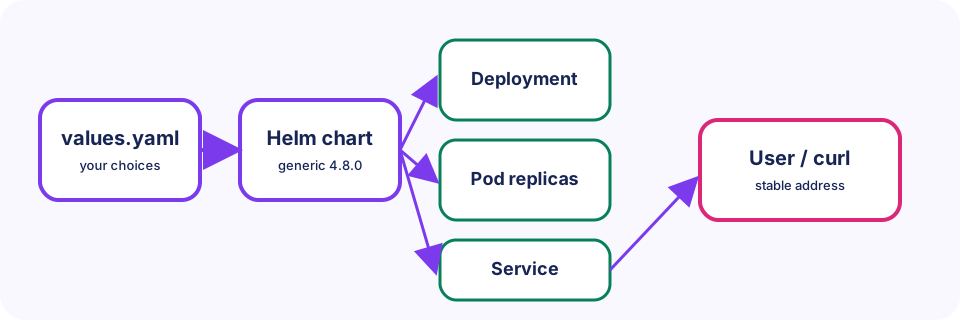
A Dockerfile turns source files into an image. A container runtime starts an isolated container from that image. Kubernetes places containers in Pods. A Deployment replaces failed Pods and scales replicas. A Service gives changing Pods one stable cluster address. An Ingress routes HTTP hostnames from outside the cluster to Services.
Helm packages Kubernetes templates as a chart. This tutorial reuses the IVIA generic chart instead of creating a custom chart. Our values.yaml chooses components, images, ports, probes, environment variables, ingress hosts, and volumes. Chart version 4.8.0 converts those values into Kubernetes resources. We do this because editing values once is safer than copying and maintaining many YAML manifests by hand.
The 12-factor connection
Two rules guide the tutorial:
- Config: deployment-specific values belong in environment variables or mounted configuration, not inside the image.
- Processes: application processes are stateless—they share nothing on their local disk. Durable data belongs in a backing service or persistent volume.
Imagine the backend handles a message:
- A parsed request body lasts for one request and belongs in process memory.
- A cached calculation is expendable and belongs in memory or a cache.
- Greeting text varies by deployment and belongs in an environment variable.
- A user message must survive restart and belongs in a database or persistent volume.
- Application code is fixed per release and belongs in the container image.
Render without deploying
We render locally so you can inspect the Kubernetes objects Helm would create without needing a cluster yet.
mkdir -p work
helm template simple-app \
  oci://harbor.ivia.ch/ivia-generic-helm-chart/ivia-generic-helm-chart \
  --version 4.8.0 \
  --namespace tutorial \
  -f static-app/values.yaml \
  > work/simple-app-rendered.yaml
You should get a non-empty file and a zero exit code. Inspect the desired replica count and image references:
grep -n -E 'kind: Deployment|replicas:|image:' \
  work/simple-app-rendered.yaml
You should see a Deployment, replicas: 1, and simple-static:local. Rendering is client-side: it creates no Kubernetes resources.
Why scaling needs stateless design
In Chapter 5 you will install this Deployment and can raise replicaCount in values. The design question is already clear from the rendered file: would two replicas share a writable local file? The static app does not write durable local state, so either Pod can answer any request. Chapter 10 revisits the opposite case with SQLite on a single volume.
Expected validation
The rendered file should contain a Deployment named simple-app-frontend, replicas: 1, and the image simple-static:local. The design review succeeds when every durable datum has an external home and no replica depends on another replica's writable filesystem.
Troubleshooting and common pitfalls
- Helm asks for registry credentials: confirm the OCI URL and chart version exactly match the command.
- Rendered output is empty: check Helm's exit status and ensure the values path is relative to the extracted chapter directory.
- “Containers are always empty”: containers can write files, but those files are ephemeral unless a volume is mounted. Stateless is an application design decision.
- “Helm runs my application”: Helm submits declarations; Kubernetes controllers run and reconcile workloads.
- Scaling SQLite to two writers: a local SQLite file plus a ReadWriteOnce volume is intentionally limited to one backend replica in Chapter 10.
Recap and practice
Recap: Containers, Pods, Deployments, Services, and Ingress form the request path. Helm turns values into those objects. Stateless processes keep durable data outside the Pod filesystem.
Try to explain in your own words:
- Why is a ConfigMap better than baking greeting text into the image?
- What breaks if two Pods both write the same local SQLite file?
Exercise: In work/simple-app-rendered.yaml, find the Service and note which port it exposes.
Stretch: List three pieces of data from an app you know and classify each as image, env/config, memory, or durable storage.