Deploy with the Generic Helm Chart
Load the static image into Minikube and deploy it through IVIA generic chart 4.8.0.
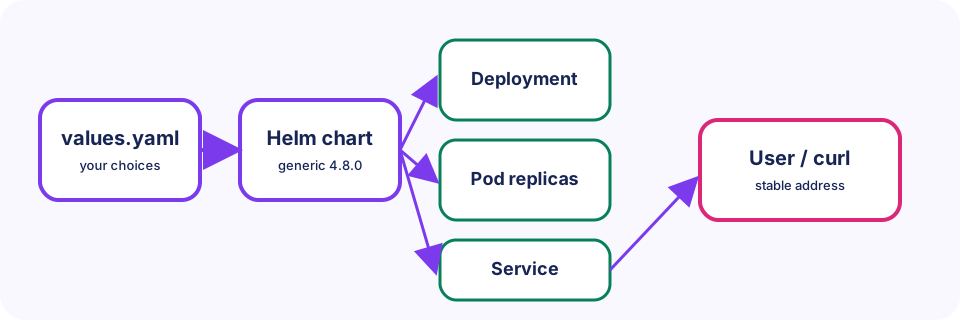
A generic chart separates platform mechanics from application choices. The chart owns reusable Kubernetes templates; your stage snapshot provides only values for the enabled component. This is how we automate deployments without hand-writing every Deployment and Service.
Last updated: 2026-07-20
Who this chapter is for
This chapter is for beginners who have a Ready Minikube cluster (Chapter 3) and can build simple-static:local (Chapter 4). You will deploy with Helm, not by writing raw Kubernetes YAML.
Download this chapter's files
Use your browser to download either ivia-chapter-05.tar.gz or ivia-chapter-05.zip. The archive is self-contained; you do not need this tutorial repository.
Open a terminal after the browser download:
cd ~/Downloads
tar -xzf ivia-chapter-05.tar.gz
cd ivia-chapter-05
All remaining relative paths in this chapter start from that extracted directory.
The challenge
Challenge: deploy the static nginx image as a Helm release in Minikube and fetch it through a Kubernetes Service.
Prerequisites
- A running,
ReadyMinikube cluster from Chapter 3. - Helm 3 and kubectl.
simple-static:localbuilt in Chapter 4, or source available to build it now (commands below rebuild into Minikube).- The Minikube node labeled
ivia.ch/nodetype=app.
Learning goals
After this chapter, you will be able to:
- Explain how Pods, Deployments, and Services relate in a simple app
- Load a local image into Minikube so the cluster can pull it
- Render and install chart version 4.8.0
- Inspect chart-created resources and validate through port forwarding
Concepts before commands
- A Pod is the smallest runnable unit; it hosts your container.
- A Deployment keeps the desired number of Pods running and replaces failed ones.
- A Service gives those Pods a stable name and port inside the cluster.
- Helm fills chart templates from your values and asks Kubernetes to create those objects.
Minikube does not automatically see every image on your Docker desktop. We build (or load) the image into Minikube’s environment and use pullPolicy: IfNotPresent so the node uses the local tag simple-static:local.
Prepare the image and cluster
We rebuild into Minikube so this chapter stays self-contained even if Chapter 4’s image lived only on the host Docker daemon.
minikube image build -t simple-static:local static-app
kubectl label node minikube ivia.ch/nodetype=app --overwrite
kubectl create namespace tutorial --dry-run=client -o yaml | kubectl apply -f -
minikube image ls | grep simple-static
You should see a simple-static:local (or similarly tagged) entry in the Minikube image list.
Render before installing
We render first because a values mistake is cheaper to catch before Helm changes the cluster.
mkdir -p work
helm template simple-app \
  oci://harbor.ivia.ch/ivia-generic-helm-chart/ivia-generic-helm-chart \
  --version 4.8.0 --namespace tutorial \
  -f static-app/values.yaml \
  > work/simple-app.yaml
kubectl apply --dry-run=client -f work/simple-app.yaml
Client dry-run should succeed without creating resources. Rendering is local and catches missing values.
Install the release
helm upgrade --install simple-app \
  oci://harbor.ivia.ch/ivia-generic-helm-chart/ivia-generic-helm-chart \
  --version 4.8.0 --namespace tutorial --create-namespace \
  --atomic --timeout 5m \
  -f static-app/values.yaml
helm status simple-app -n tutorial
kubectl get deployment,pod,service -n tutorial
kubectl rollout status deployment/simple-app-frontend -n tutorial --timeout=120s
You should see STATUS: deployed, one Pod 1/1 Running, and a Service on port 8080. The chart names the Service and Deployment simple-app-frontend: release name plus component name.
Reach the Service
Keep this command running so your laptop can talk to the cluster Service:
kubectl port-forward service/simple-app-frontend 8080:8080 -n tutorial
From a second terminal:
curl --fail http://localhost:8080/
curl --fail http://localhost:8080/healthz
You should see the page text and ok. Stop forwarding with Ctrl+C. Keep the release for later chapters. Remove it only when intended with helm uninstall simple-app -n tutorial.
Expected validation
helm status reports STATUS: deployed. One frontend Pod is 1/1 Running, the Service exposes 8080, the page includes Hello from Kubernetes!, and /healthz returns ok.
Troubleshooting and common pitfalls
ErrImagePull/ImagePullBackOff: confirmminikube image lscontainssimple-static:localand values usepullPolicy: IfNotPresent.- Pod stays
Pending: describe it and verifyivia.ch/nodetype=appappears inkubectl get node minikube --show-labels. - Atomic upgrade times out: inspect
kubectl get events -n tutorial --sort-by=.lastTimestamp; Helm may already have rolled back. - Port is in use: stop the Chapter 4 container or forward
8081:8080. - OCI chart not found: copy the registry path and version exactly.
- Manual object edits disappear: Helm owns these objects; change values and upgrade instead.
Recap and practice
Recap: You loaded a local image into Minikube, rendered chart 4.8.0, installed a release, and reached the app through a Service port-forward.
Try to explain in your own words:
- Why use
helm templatebeforehelm upgrade? - What problem does a Service solve that a Pod IP alone does not?
Exercise: Run kubectl describe deployment/simple-app-frontend -n tutorial and note the image name and ready replicas.
Stretch: In a copy of static-app/values.yaml, set the frontend replicaCount (or equivalent replicas field used by the chart) to 2, upgrade the release, and confirm kubectl get pods -n tutorial shows two Ready Pods. Return to one replica when finished.