Add React, Vite, and FastAPI
Replace the static page with a small React frontend and typed FastAPI backend, each built as its own image.
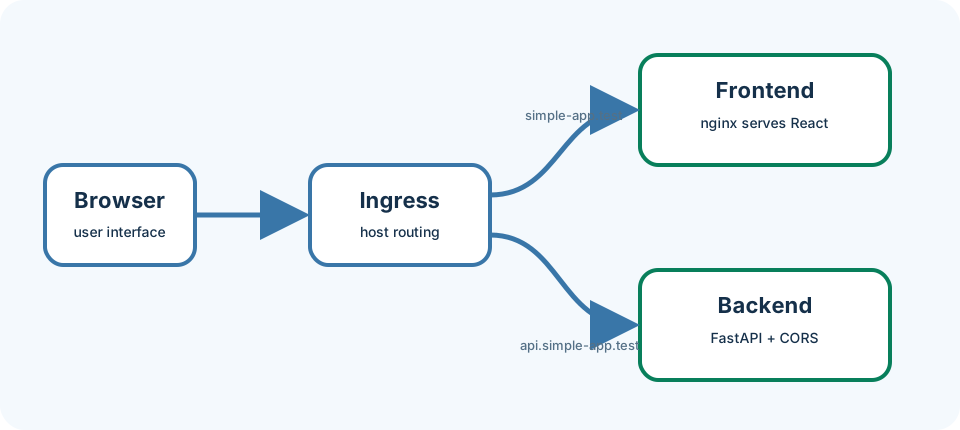
The full-stack snapshot keeps one responsibility per container. The frontend is the user interface: Vite builds React into static files, and nginx serves them. The backend is an API (application programming interface): FastAPI answers JSON requests. The browser joins them through HTTP. This chapter runs both containers locally; Chapter 9 moves the same images into Kubernetes.
Last updated: 2026-07-20
Who this chapter is for
This chapter is for beginners who finished the static-container lessons and are ready for two cooperating services. You need Docker only—no host Node.js or Python install.
Download this chapter's files
Use your browser to download either ivia-chapter-08.tar.gz or ivia-chapter-08.zip. The archive is self-contained; you do not need this tutorial repository.
Open a terminal after the browser download:
cd ~/Downloads
tar -xzf ivia-chapter-08.tar.gz
cd ivia-chapter-08
All remaining relative paths in this chapter start from that extracted directory.
The challenge
Challenge: build and run both full-stack containers locally, then load a React page that displays a greeting returned by FastAPI.
Prerequisites
- Docker or a compatible container CLI.
- Ports 5173 and 8080 available.
- The extracted Chapter 8 package, with your terminal in its top-level directory.
- No host Node.js or Python installation; the images contain build tools.
Learning goals
After this chapter, you will be able to:
- Identify frontend and backend responsibilities
- Understand Vite build output and nginx runtime serving
- Read minimal FastAPI routes
- Connect two containers through browser-visible ports
- Validate each service independently before blaming CORS
Inspect the architecture
find fullstack-app -maxdepth 3 -type f -print
sed -n '1,200p' fullstack-app/frontend/src/App.jsx
sed -n '1,200p' fullstack-app/backend/app/main.py
config.js loads before React, so deployment can replace the API URL without rebuilding. The local default is http://localhost:8080. FastAPI permits http://localhost:5173 through CORS (browser policy that controls which web pages may call which APIs).
Build both images
We build two images so each service can scale and release independently later.
docker build -t simple-backend:local fullstack-app/backend
docker build -t simple-frontend:local fullstack-app/frontend
Dependency manifests are copied before source files so the builder can reuse dependency layers when only source changes. You should see successful tags for both images.
Run and connect
Start the backend first so the frontend has something to call:
docker run --rm --name simple-backend -d \
  -p 8080:8080 \
  -e GREETING='Hello from two containers!' \
  simple-backend:local
docker run --rm --name simple-frontend -d \
  -p 5173:8080 simple-frontend:local
Validate FastAPI directly (this check ignores the browser):
curl --fail http://localhost:8080/health
curl --fail http://localhost:8080/api/greeting
You should see JSON with "status":"ok" and a greeting containing Hello from two containers!.
Open http://localhost:5173. It should show the same greeting. Inspect and stop:
docker logs simple-backend
docker logs simple-frontend
docker stop simple-frontend simple-backend
React runs in the browser, not inside the frontend container’s Node process at runtime. Therefore local localhost:8080 reaches the host-published backend. Chapter 9 replaces that URL with an ingress hostname inside Kubernetes.
Expected validation
Health returns {"status":"ok"}. Greeting returns JSON containing Hello from two containers!. The browser displays that greeting without a CORS error in its developer console.
Troubleshooting and common pitfalls
Failed to fetch: checkdocker psand curl the API directly.- CORS error: open exactly
http://localhost:5173; scheme, hostname, and port define an origin. - Dependency download fails: check network and registry access; host dependencies do not fix a container build.
- Backend exits: inspect logs; import errors often indicate a changed build context.
- Old page: rebuild and recreate the frontend container, then hard-refresh.
- Vite expected at runtime: this image uses Vite only to build; nginx serves production files.
Recap and practice
Recap: Two images, two ports, one HTTP contract. Validate the API with curl before debugging the browser.
Try to explain in your own words:
- Why can React talk to
localhost:8080even though it was served from port 5173? - What is the difference between this local Docker setup and the Kubernetes deploy in Chapter 9?
Exercise: Change GREETING on a new backend container run and confirm both curl and the browser show the new text.
Stretch: Read fullstack-app/frontend/public/config.js (or equivalent) and write one sentence about why runtime config beats rebuilding the frontend for every API URL.